What Actually Happens After You Sign Up for UserTesting
Everyone talks about how much user testing pays. Ten dollars for twenty minutes. Thirty dollars for live interviews. Easy money, right?
Nobody talks about what happens between signing up and getting that first payment. The sample test you might fail. The screeners that disqualify you after two minutes. The five star rating system that determines whether you get more tests or get ghosted.
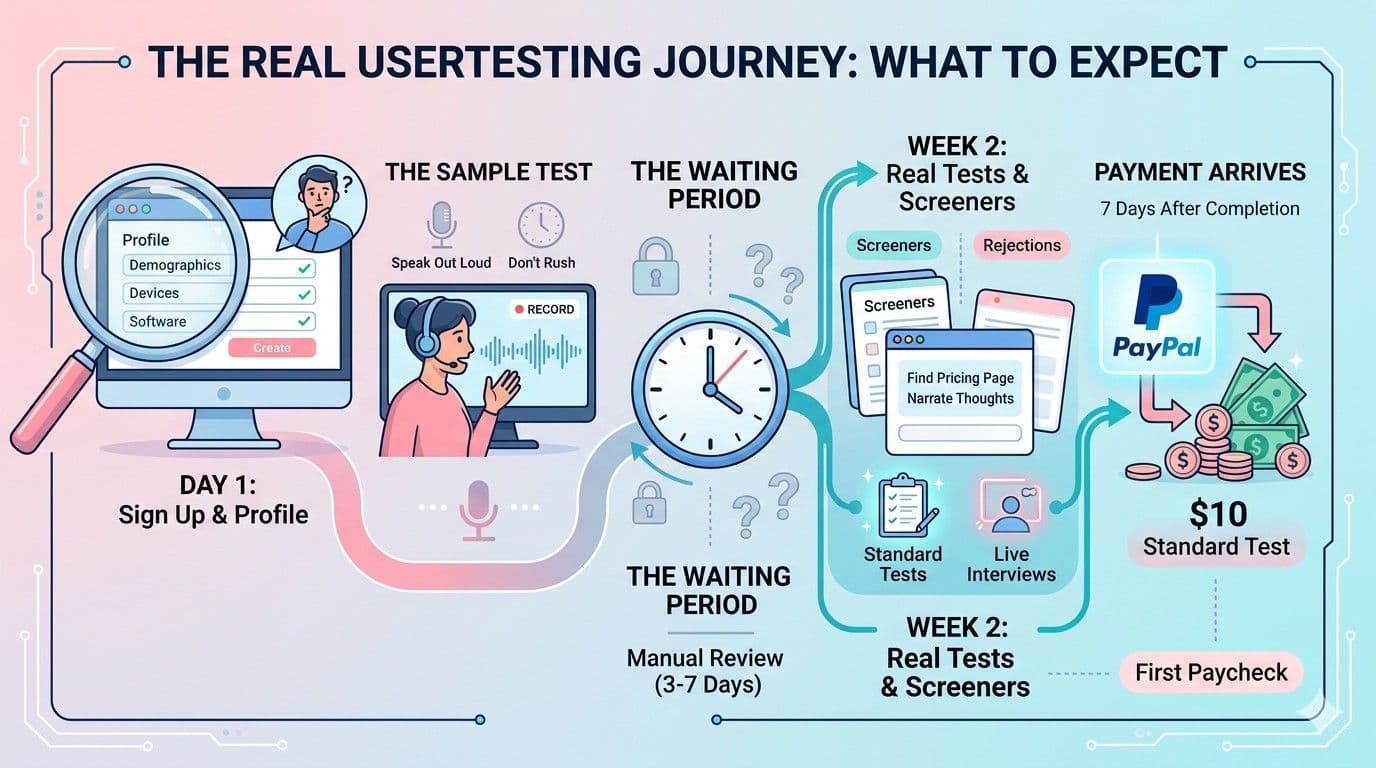
Here is the real timeline, from account creation to first PayPal deposit.
🧪 Most people quit before their first test. Not because the work is hard, but because the process between signing up and getting approved is confusing and poorly explained.
Day 1: The Sign Up That Takes Longer Than Expected
Signing up for UserTesting takes about 15 minutes. Not because the form is long, but because they ask detailed demographic questions. Age, location, income, job title, devices owned, software used. Every answer determines which tests you see later.
The advice you will see everywhere is "complete your profile 100%." This is correct. More profile data means more qualifying tests. But what nobody mentions is that you also need to list devices and software you do not currently own but could access. A friend's iPad. A work laptop. An old Android phone. Borrowing a device for a test is perfectly fine, and having more devices in your profile unlocks more test opportunities.
After submitting your profile, you are prompted to complete the sample test. This is where most people fail.
The Sample Test: Why People Fail
The sample test requires you to record your screen and microphone while navigating a practice website. You must speak your thoughts out loud constantly. Every observation. Every confusion. Every click.
The most common reasons for rejection:
Speaking too little is the number one problem. People naturally work in silence. The sample test requires the opposite. If you stop talking for more than a few seconds, the reviewer marks it as incomplete.
Mumbling or speaking unclearly also causes failures. The microphone quality matters. A laptop's built in microphone is usually fine, but a noisy environment creates problems. Background conversations, traffic sounds, or even a loud fan can make your audio difficult to review.
Rushing through tasks without explaining your thought process is another common mistake. The reviewer wants to understand why you clicked something, not just that you clicked it. Saying "I am looking for the pricing page, I expected it in the top navigation but it is not there, let me check the footer" is good. Clicking around silently is not.
How to pass on the first attempt: Practice on any website for 10 minutes before starting. Open Amazon. Search for a product. Narrate everything. "I am typing wireless headphones in the search bar. The suggestions are showing me brands. I am clicking the first result. The product page loaded. I am scrolling down to read reviews." It feels ridiculous but this is exactly what they want.
💡 If you get stuck during the sample test, say so. "I cannot find the login button. The navigation is confusing me." This is genuine feedback, and companies want genuine feedback. You will not fail for being confused. You will fail for being silent.
Day 2 to 7: The Waiting Period
After submitting the sample test, nothing happens for a while. UserTesting reviews each sample manually. Approval typically takes 3 to 7 days. Some people wait two weeks.
During this period, do not create a second account. It will get you permanently banned. Do not email support asking for updates. They do not respond to status inquiries.
Instead, sign up for other platforms while waiting. Userlytics and Trymata have faster approval processes. Getting approved on multiple platforms means that when one is quiet, another might have work.
Week 2: The First Real Tests
Once approved, tests start appearing. The frequency depends entirely on your demographics. Someone living in the United States, aged 25 to 40, working in technology, with multiple devices will see significantly more tests than someone outside the US with a single device.
The screener problem nobody mentions:
Before every test, you answer screener questions. These determine if you match what the company is looking for. Screeners take 1 to 3 minutes and you are not paid for them.
Common screener questions include your job function, whether you make purchasing decisions, what software you use, and whether you have purchased specific products recently. Companies often want very specific people. HR professionals who use Slack. Small business owners who handle their own accounting. Parents who buy organic groceries.
You will be disqualified from most screeners. This is normal. A 20% qualification rate is typical. That means for every five screeners you complete, you qualify for one test.
What your first test feels like:
The test interface shows you a website or app and gives you specific tasks. "Find the pricing page and tell us if the plans are clear." or "Try to purchase a product and stop at the payment screen."
You share your screen and microphone. You narrate your thoughts. The entire thing feels unusual for the first few tests. Speaking your thoughts out loud while someone will later watch the recording is strange. This feeling disappears after three or four tests.
Week 3 to 4: Building a Rating
Every test you complete gets a star rating from the company. One to five stars. Your average rating determines how many future tests you receive.
How the rating system actually works:
A 5 star rating means you provided clear, useful feedback. You completed all tasks and spoke constantly.
A 4 star rating is acceptable but not ideal. Your average needs to stay above 4 stars to maintain good test frequency.
Anything below 4 stars is a problem. It signals to the platform that your feedback is not valuable. Too many low ratings and your account gets flagged. Tests stop appearing.
How to maintain a high rating:
Complete every task in the test instructions. If there are five tasks, do all five. Do not skip any.
Speak constantly. Even if you are just reading text, read it aloud. Silence is the most common reason for low ratings.
Be specific. Do not say "this is confusing." Say "the pricing table is confusing because the monthly and annual plans use different font sizes, making it hard to compare them."
Answer all follow up questions at the end of the test. These are usually four or five written questions about your experience. Skipping them signals low effort.
The First Paycheck
UserTesting pays exactly 7 days after each completed test. Not after approval. Not after review. Seven calendar days after you submit.
Payment arrives via PayPal. The amount is exactly what was quoted. Ten dollars for standard tests. Thirty to sixty dollars for live interviews. No fees are deducted by UserTesting, though PayPal may charge a small currency conversion fee for non US accounts.
The first payment feels disproportionately satisfying. Ten dollars is not much money. But earning it by talking to yourself while browsing a website for 20 minutes feels different than earning it through traditional work. There is no boss. No schedule. No commitment.
Common Mistakes That Reduce Earnings
Not installing the browser extension. Tests fill up in under a minute. The extension sends instant notifications. Without it, you will miss most opportunities.
Leaving your profile incomplete. Every unanswered question is a missed test opportunity. Companies filter by demographics. If your job title is blank, you are invisible to anyone filtering by profession.
Taking tests on a noisy environment. Background noise makes transcription difficult and annoys reviewers. Find a quiet room or use a headset with noise cancellation.
Quitting after a slow week. Test volume fluctuates. Some weeks you get eight tests. Some weeks you get two. This is normal and not a sign that your account has a problem.
Creating multiple accounts. This results in a permanent ban across all testing platforms. They share information and detect duplicates through IP addresses and device fingerprints.
Which Platforms to Add After UserTesting
UserTesting alone is not enough for consistent income. Multiple platforms fill in the gaps when one is quiet.
| Platform | Best For | Approval Time |
|---|---|---|
| Userlytics | More frequent tests, easier approval | 3 to 5 days |
| Trymata | Interesting ecommerce and SaaS tests | 5 to 7 days |
| UserFeel | Consistent daily test availability | 2 to 4 days |
| Respondent.io | High paying live interviews ($50 to $150) | Varies by study |
Full comparison of UserTesting vs Userlytics →
🧪 The hardest part of user testing is not the work itself. It is getting through the sample test, waiting for approval, and building a rating. Most people quit during this phase.
Sign up today. Practice your narration for 10 minutes. Complete the sample test. The process takes a few days, but once you are approved, paid tests start appearing.